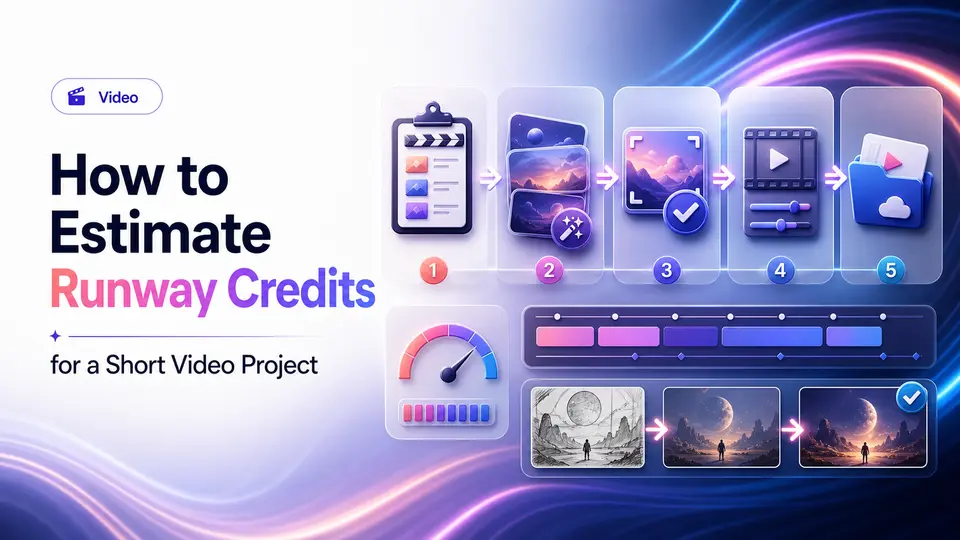
A producer needs a five-second establishing shot that would be difficult to film. The first generation has the right camera movement but a broken sign. The next changes the building. Several more introduce continuity problems, and the usable version still needs trimming, color work, sound, and approval. Five seconds on the timeline can represent a much larger generation budget.
Runway should be evaluated at the project level, where attempts, models, duration, resolution, exports, storage, and post-production all meet. A headline credit allowance cannot predict finished footage without a representative shot test. The account and workspace also matter because source assets, client material, project history, billing, and the final approved files need an owner after the experiment becomes a production.
The short answer
- Estimate credits from shot length, retries, models, and resolution across a real project.
- Generated footage still needs continuity, rights, brand, and factual review.
- Confirm the represented plan, account ownership, and output terms before purchase.
Choose the video job before the plan
Runway can support generative shots, image-to-video work, concept tests, and parts of an editing workflow. Define whether you need a final clip, storyboard material, background footage, variations, or an effect inside a larger production. The target duration, aspect ratio, resolution, and number of approved shots drive the real workload.
Create a shot list and test the hardest representative scene. Count failed generations, alternate takes, exports, and manual edits. A five-second approved shot may require far more than five seconds of generation, which is why a project-level test is more useful than a headline credit number.
Build a low, expected, and high shot budget
Start with a shot list that names purpose, duration, action, framing, camera movement, aspect ratio, resolution, and continuity requirements. Select the hardest representative shot and record every generation, extension, variation, upscale, and export needed to approve it. Use that evidence to create low, expected, and high scenarios for the rest of the project rather than multiplying the duration by a single optimistic rate.
Include the work outside generation. Someone must select takes, track prompts and references, remove failures, preserve approved versions, and prepare the clips for an editing timeline. When the project has several shots, add an allowance for consistency tests and transitions. The estimate should state the model and provider documentation reviewed because a different feature, duration, or output setting can change consumption.
- Low case: the direction is stable and few alternate takes are required.
- Expected case: normal failures, variations, extensions, and cleanup are included.
- High case: continuity breaks or a client revision forces substantial regeneration.
- Production case: add editing, sound, captions, color, review, and delivery time.
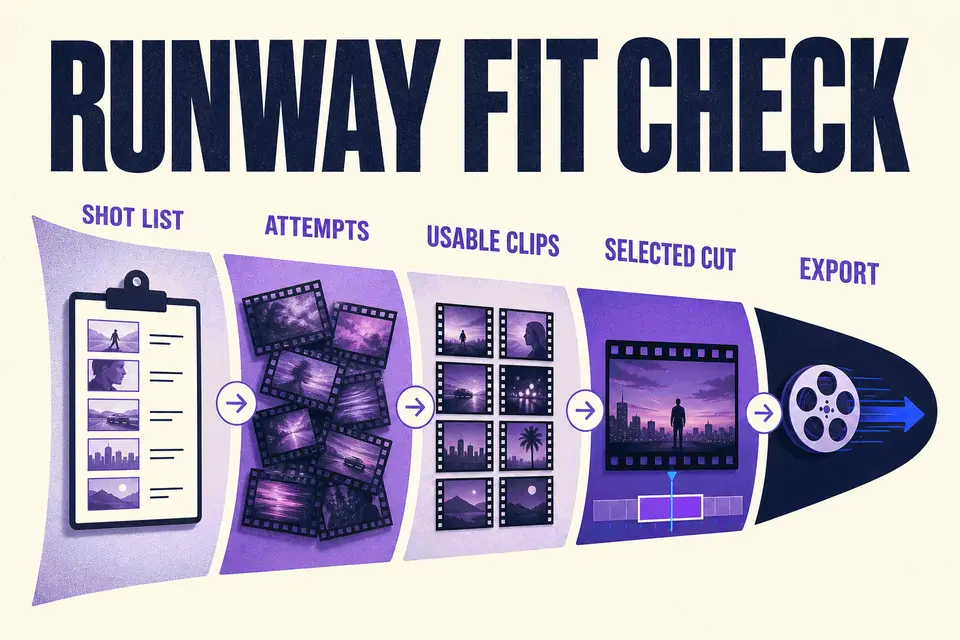
A five-second approved shot may require far more than five seconds of generation.
Taploop decision principle
Translate credits into project capacity
Runway's plan and model options are provider-controlled. Credits can be consumed differently depending on the model, duration, resolution, and feature. Check the current pricing and usage documentation, then estimate a low, expected, and high-credit scenario for your project.
Also review export resolution, watermarks, storage, collaboration, and any limits that affect delivery. A plan with enough generations may still be a poor fit if the required export or workspace feature sits in another tier.
- Budget for retries and variations, not only the final seconds.
- Confirm the model and resolution used in your estimate.
- Check storage and project retention for ongoing work.
- Keep a manual edit and quality-control stage in the schedule.
Plan continuity and post-production before generating
Write a continuity sheet for recurring characters, wardrobe, location, product details, lighting, lens language, and palette. Keep approved references and note which generated shot establishes each fact. Without that discipline, a sequence can consume credits while drifting farther from the edit. Review faces, hands, text, logos, and factual details at full output size rather than approving a small preview.
Runway is one stage of a video pipeline. Decide where the final edit, audio, captions, graphics, color, quality control, and archive will live. Confirm permission for uploaded footage, images, voices, and brand material, and check the provider's current terms for the intended use. A plan with enough generation capacity can still fail the project if export, storage, collaboration, or handoff needs are not supported by the chosen tier.
Set account, project, and review ownership
Choose an account that should retain source assets, project files, generations, billing records, and recovery access. For client or team work, decide who owns the workspace and how material will be handed over before production begins.
Review every generated shot for continuity, faces, hands, text, logos, product details, and unintended resemblance. Confirm permissions for uploaded references and the current rules for business projects. Generative speed does not remove the producer's responsibility for the final cut.
Compare workflows and check the current offer
Descript is centered on transcript-led recording and editing, while Runway is often considered for generative visuals and transformations. Adobe Firefly can overlap on some generation tasks. Pick the tool that solves the most expensive step in your actual production chain.
Before checking current Runway offer details, verify the exact tier, included credits, model and export needs, account path, term, region, renewal behavior, final total, and remedy information. Do not infer a tier from a generic product name.
The verdict
Verdict: useful when generative shots remove a defined production obstacle
Runway is most compelling for creators who can identify specific generative or transformation work and estimate it from a representative shot. It is less compelling when the real need is transcript-led editing, conventional capture, or a finished-video system that the buyer has not planned. Continuity and post-production usually determine whether generated seconds become usable footage.
If the project test supports the plan, verify the exact current tier and its documented credits, models, export, storage, and collaboration details. Then review the live Taploop offer for the account path, represented term, region, renewal behavior, final total, access method, and remedy terms. Do not infer a tier, finished duration, rights clearance, instant delivery, or live availability from a generic Runway label.
Product guide
Need the complete Runway guide?
Review product capabilities, platforms, official sources, and the current Taploop buying path in one place.
Compare before you choose
These comparison and category pages help you review nearby products and tradeoffs before choosing.
Continue with a related workflow
These nearby articles cover other practical questions about runway video credit estimation that you may want to explore next.

Ready to review Runway?
Check the product page for the currently published plan, term, account, region, renewal, price, and remedy details. Purchase controls appear only when the required offer data and inventory are present.
Frequently asked questions
How should I estimate Runway credits?
Use a representative shot and include failed generations, variations, extensions, model choice, duration, resolution, and exports. Build low, expected, and high scenarios, then add continuity testing across the sequence. Review Runway's current plan and usage documentation because consumption can change with the feature and settings used.
Is Runway the same kind of editor as Descript?
They overlap, but the core workflows differ. Runway is commonly evaluated for generative visual production and transformations, while Descript centers recording and transcript-led editing. Test the most expensive step in your actual production chain rather than buying both to solve an undefined video problem.
What rights do I need for reference footage or images?
Use only material you are permitted to upload and transform. Review provider terms, client agreements, performer or location releases, brand permissions, and destination-platform rules where relevant. Generated output still needs inspection for recognizable people, logos, unwanted resemblance, and details that could mislead an audience.
Do unused Runway credits carry over?
That depends on the current provider plan and billing rules. Check Runway's official documentation on the decision date instead of relying on an older article. Estimate the plan around work you expect to complete during the applicable period, including retries and client revisions.
What should a Taploop Runway offer identify?
Look for the exact tier, included credits, account and access path, term, region, renewal treatment, final total, and remedy terms. Purchase controls should appear only when required offer data and inventory are present. A generic product name should not be used to infer the represented tier or output capacity.
Official sources reviewed
Product plans change. These provider sources were checked on July 18, 2026; review them again when you make a purchase decision.