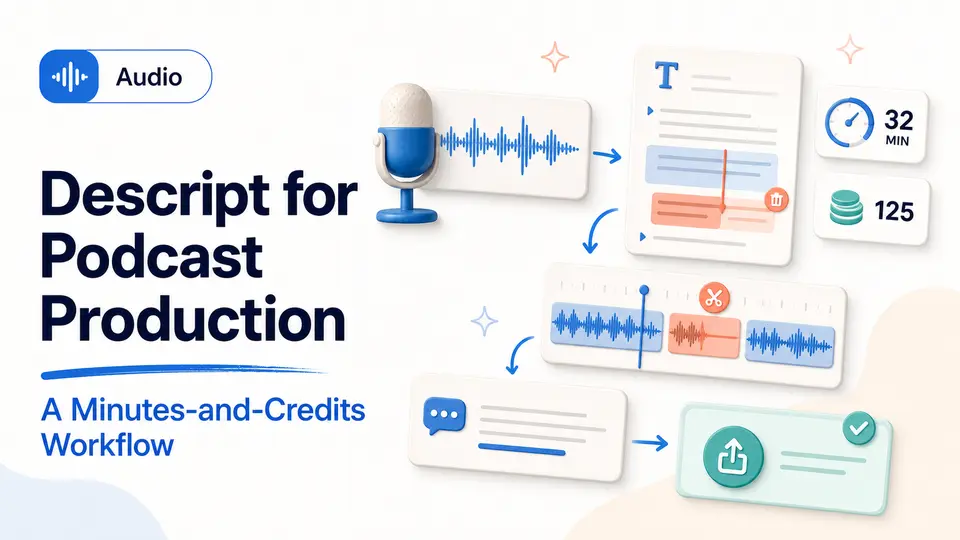
A podcast producer imports a forty-five-minute interview and sees the transcript almost immediately. Removing a repeated answer is as simple as editing text, but the episode is not finished. Names need correction, the cut needs listening, filler-word changes need review, captions need proofing, the mix needs attention, and the final export still has to meet the publisher's standard.
Descript is valuable when transcript-led editing improves that complete path from recording to approved file. The buying decision therefore has two different allowance questions—media processed and AI actions used—plus recording quality, export, storage, collaboration, and workspace ownership. A plan should be tested with a real episode or video, not a single cleanup feature shown outside the pressure of an actual production schedule.
The short answer
- Test Descript with a complete recording-to-export workflow, not an isolated AI feature.
- Media minutes and AI credits measure different parts of current plans.
- Workspace ownership, storage, export needs, and account access belong in the buying decision.
Test the transcript-led editing workflow
Descript treats recorded audio and video as editable text, which can make spoken-word projects feel closer to editing a document. It may fit podcasts, interviews, tutorials, screen recordings, webinars, and short clips. The right test is a complete episode or video that resembles your normal production.
Measure transcription cleanup, structural editing, audio repair, captions, visual changes, export, and review. A fast rough cut is helpful only if the final file meets the quality, format, and approval needs of the channel where it will be published.
Model a representative month of production
List every recurring project: episodes, interviews, screen recordings, webinars, social clips, client revisions, and re-exports. Add the duration of incoming media, then separately list the AI-assisted actions normally used. One monthly podcast may be media-heavy with modest AI demand, while several short promotional videos can consume more AI actions than their duration suggests.
Run one project through recording or import, transcript correction, structural editing, audio repair, captions, visual changes, review, and export. Record what had to be redone after editorial feedback. Compare the resulting media and AI demand with Descript's current official plan table. The project record should also note export resolution, watermark treatment, storage, and collaborators because those requirements can determine the tier even when allowances appear sufficient.
- Add all source-media duration expected in the billing period.
- Count AI actions used for cleanup, generation, clips, and revisions.
- Include failed recordings, corrected transcripts, and post-approval re-exports.
- Confirm storage, collaboration, resolution, and watermark needs separately.
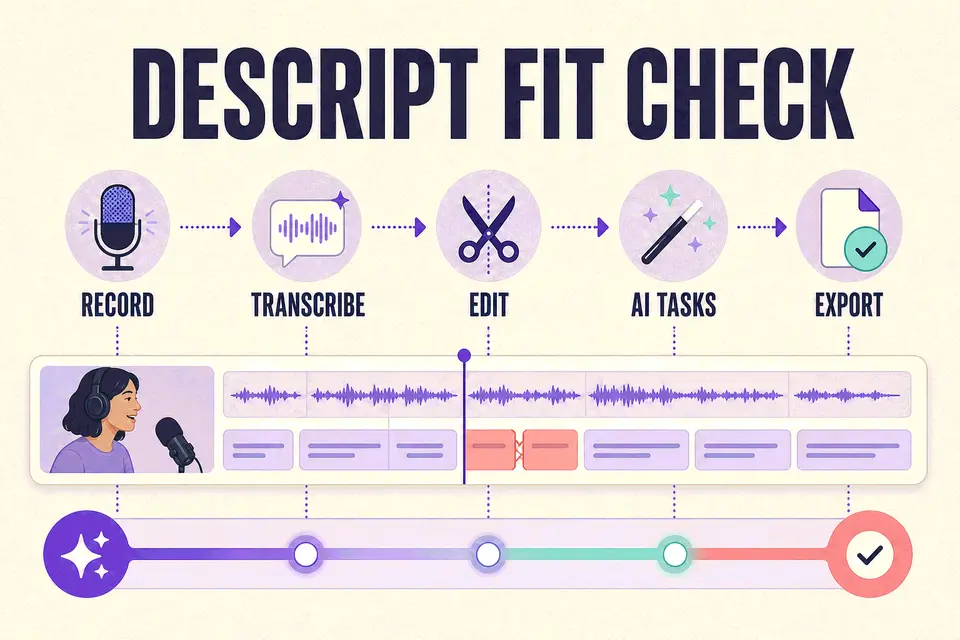
A fast rough cut is helpful only if the final file meets the quality, format, and approval needs of the channel where it will be published.
Taploop decision principle
Distinguish media minutes from AI credits
Descript's current plans use media minutes for imported or recorded content and AI credits for supported AI-powered actions. Features such as its co-editor, audio enhancement, filler-word removal, generated media, and other tools can draw from AI credits. Unused allowances may not carry forward.
Estimate both sides of the workflow. A long monthly podcast can consume media time even when AI use is modest, while a short promotional project may use more AI actions. Check the current plan table and help documentation because allowances and feature costs can change.
- Add the duration of all media you expect to process each month.
- List the AI actions used in a representative project.
- Check export resolution, watermarks, storage, and collaboration.
- Budget for corrections and reprocessing after editorial changes.
Confirm recording, export, and workspace ownership
Remote recording quality depends on participant setup, permissions, connection, and backup practices as well as software. Test the microphone, camera, local capture, file recovery, and export process before using the tool for an important session.
Decide who should own the account, workspace, recordings, transcripts, custom voices, billing, and recovery. This is especially important for agencies and clients. Then verify that the Taploop offer applies to the intended account and names the represented plan and term.
Protect quality, approval, and handoff
Listen to the final edit from beginning to end. Transcript-based changes can alter timing or remove words in ways that read correctly but sound unnatural. Check names, captions, speaker labels, audio repair, generated speech, cuts around breaths, music levels, and any visual replacement. Keep the untouched source and an export approved by the person responsible for publication.
For agency or team work, define who owns the workspace, recordings, transcripts, custom voices, templates, billing, and recovery. Decide how source files and edit decisions will be delivered to a client or successor. A personal workspace can become an operational risk when the only account holder leaves. Verify that the selected plan supports the intended collaboration and that the Taploop offer applies to the correct account rather than relying on a generic Creator Plan label.
Compare the production role and check the offer
Runway is a closer option for generative visual shots, while ElevenLabs specializes in voice production. Canva Pro may cover lightweight layout and social adaptation. Descript is most compelling when transcript-led recording and editing are central to the job.
Before checking current Descript offer details, verify the tier, media minutes, AI credits, workspace and account path, export needs, term, region, renewal behavior, final total, and remedy terms. The words Creator Plan are not enough without the current allowance.
The verdict
Verdict: strongest for spoken-word teams that value transcript-led editing
Descript is easiest to justify when interviews, podcasts, tutorials, webinars, or screen recordings recur and transcript-led editing reduces the complete time to an approved export. It is less convincing for a buyer whose primary need is generative visual footage or who will still finish nearly every important step elsewhere. A representative monthly workload should show both media demand and AI-action demand before the plan is chosen.
If the workflow fits, verify the current Descript tier, allowances, export, storage, and collaboration details with the provider. Then inspect the live Taploop offer for the workspace and account path, represented term, region, renewal behavior, final total, access method, and remedy terms. Do not infer carryover, a watermark-free export, instant activation, or current availability unless the applicable plan and offer explicitly state it.
Product guide
Need the complete Descript guide?
Review product capabilities, platforms, official sources, and the current Taploop buying path in one place.
Compare before you choose
These comparison and category pages help you review nearby products and tradeoffs before choosing.
Continue with a related workflow
These nearby articles cover other practical questions about descript podcast production workflow that you may want to explore next.

Ready to review Descript?
Check the product page for the currently published plan, term, account, region, renewal, price, and remedy details. Purchase controls appear only when the required offer data and inventory are present.
Frequently asked questions
Are media minutes and AI credits the same?
No. Current Descript documentation uses them for different parts of the workflow. Estimate the duration of all imported or recorded material, then separately count the AI-assisted actions used during editing and revision. Check the current plan documentation because allowances and feature consumption can change.
What is the best way to test Descript?
Run a representative project from recording or import through transcript correction, structural editing, audio cleanup, captions, review, and final export. Measure the approved result, not the first rough cut. Include stakeholder revisions and a full listen because text-based edits can introduce problems that are easier to hear than read.
Which export quality or watermark applies?
That depends on the current Descript tier and export settings. Check the official plan table for the exact resolution, watermark, and other delivery requirements on the decision date. Export a test file to the real publishing specification before relying on the plan for a customer or scheduled release.
Which account should hold the workspace?
Use the account that should control recordings, source files, transcripts, custom assets, billing, recovery, and client handoff. Teams should document access and offboarding. Confirm whether the offer applies to that existing account and avoid placing important client work in a personal workspace with no transfer plan.
What should a Taploop Descript offer identify?
Look for the exact tier, media and AI allowances, account or workspace path, term, region, renewal treatment, final total, and remedy terms. Purchase controls should appear only when the required offer data and inventory are present. Creator Plan wording alone does not identify the current allowance.
Official sources reviewed
Product plans change. These provider sources were checked on July 18, 2026; review them again when you make a purchase decision.