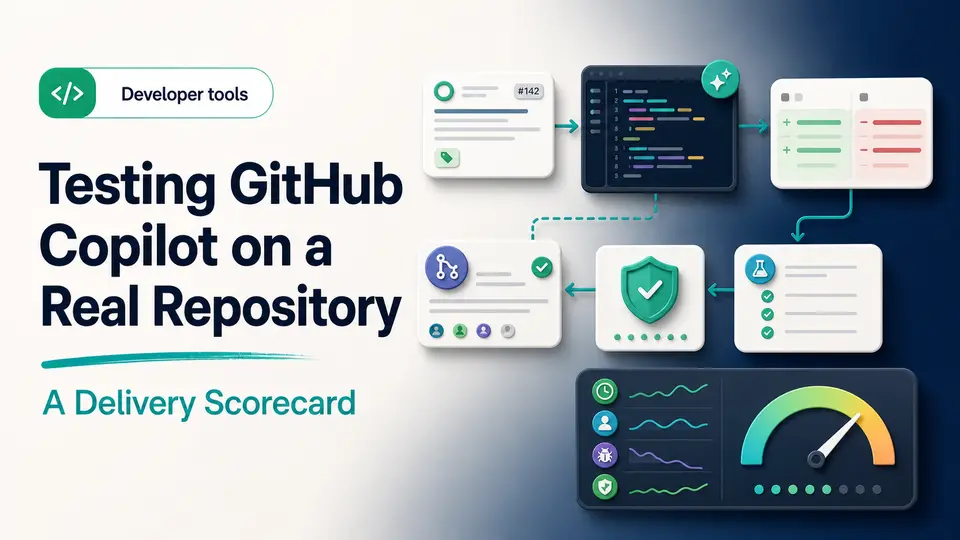
A developer accepts a convincing code suggestion in seconds and then spends an hour discovering that it mishandles an empty input and bypasses an existing authorization check. The tool accelerated typing, but the change moved backward once debugging, tests, security review, and rework were counted. That is the measurement problem behind every AI coding subscription.
GitHub Copilot should be tested on the path from issue to shipped change, not on how quickly code appears in an editor. The right plan also depends on the GitHub account, supported environment, current usage model, repository policy, and whether an organization needs managed licensing and controls. A buyer should prove value in a safe repository before connecting sensitive code or treating a marketplace offer as an eligible entitlement.
The short answer
- Test Copilot on a safe repository and measure accepted, reviewed, and shipped work.
- Plans differ by usage, models, organization controls, policy management, and support.
- Every suggestion still requires tests, security review, licensing judgment, and human ownership.
Choose the coding jobs you want to improve
GitHub Copilot can assist with completions, explanations, tests, documentation, refactoring, and agent-style tasks across supported environments. Identify where your development time is actually going. Repetitive code, unfamiliar APIs, test scaffolding, and repository orientation each need a different evaluation.
Use a non-sensitive project with a clear issue and acceptance tests. Measure time to a working change, review effort, defects, and how much suggested code survives. Faster typing is not the same as faster delivery if the result creates more debugging or security work.
Run a baseline and assisted repository test
Select a non-sensitive issue with clear acceptance criteria and automated tests. Complete or estimate the task using the normal workflow, then run a comparable task with Copilot. Record time spent understanding the repository, preparing context, reviewing suggestions, fixing defects, running tests, updating documentation, and responding to review. Keep the accepted diff and final merged result rather than counting every generated line.
Repeat the test with different job types: repetitive code, an unfamiliar API, test scaffolding, and a refactor with behavioral constraints. Note when suggestions fail to follow local conventions or overlook a security boundary. A subscription earns its place when reviewed changes ship faster without increasing defects, dependency risk, or maintenance cost. A dramatic autocomplete demo is not a substitute for that evidence.
- Start with a safe repository and an issue that has objective acceptance tests.
- Measure time to reviewed and merged code, not time to the first suggestion.
- Count rejected suggestions, debugging, security findings, and later rework.
- Compare performance across several task types before generalizing.
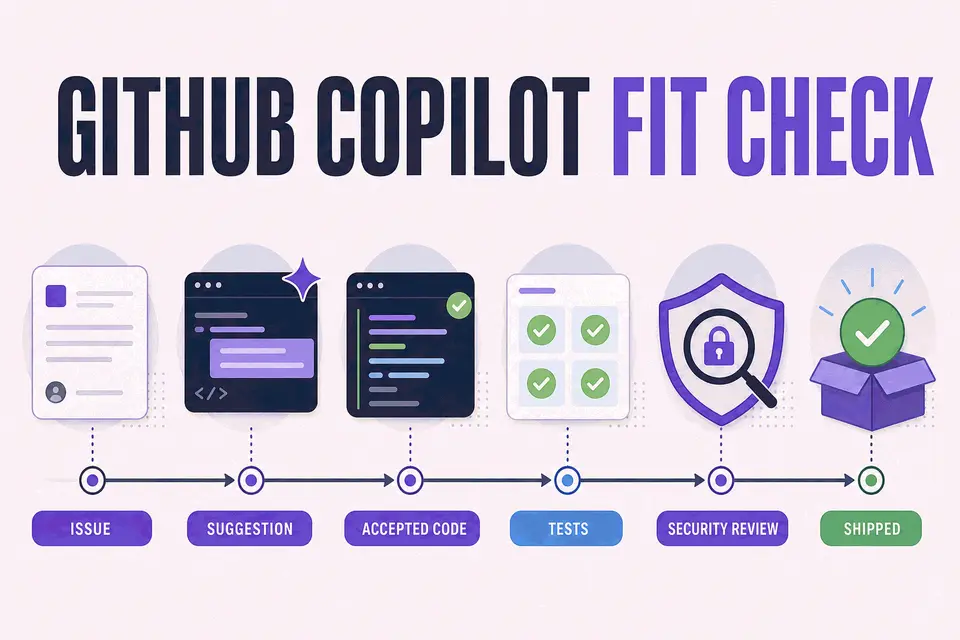
Faster typing is not the same as faster delivery if the result creates more debugging or security work.
Taploop decision principle
Match the plan to your environment and usage
GitHub currently publishes Free, Pro, higher-usage individual options, and organization plans. Included models, agent features, premium usage, administration, policy controls, and indemnity can differ. Plan names and allowances can change, so check the official table before selecting an offer.
Confirm support for your IDE, operating system, repository host, command-line workflow, and organization policy. A personal plan may be inappropriate for employer code when the organization needs centralized licensing, controls, audit records, or a defined data policy.
- Check the IDE, extensions, CLI, and GitHub surfaces you use daily.
- Review premium-request or credit allowances against your workload.
- Confirm organization rules for code and context sent to AI services.
- Keep secrets and protected production data out of prompts and logs.
Resolve GitHub account ownership and code review
The Copilot entitlement should attach to the GitHub account that is allowed to use it. Confirm whether an employer-managed account, personal account, or organization seat is required. Check who controls billing, cancellation, repository access, and recovery before selecting any third-party offer.
Treat generated code like an external contribution. Read it, run tests, scan dependencies, review security boundaries, and consider whether a suggestion resembles licensed code. The developer remains responsible for the change that is merged and deployed.
Separate individual experimentation from organization needs
An individual developer can test personal productivity, but an employer may need centralized seat management, policy controls, data decisions, audit records, support, and contractual terms. Determine which GitHub identity is permitted to access the repositories and whether a personal subscription is allowed for company code. Procurement convenience should not override the organization's security and licensing model.
Document what context may leave the development environment, which repositories or file types are excluded, and how suggestions are reviewed. Keep secrets, credentials, and protected production data out of prompts and logs. If the organization cannot approve the provider, plan, account, and current data controls, do not connect the repository. Evaluate the appropriate managed route rather than buying an individual entitlement and resolving governance afterward.
Compare coding assistance and check the offer
ChatGPT Plus and Perplexity Pro can support explanation and research outside the IDE. Cursor offers a different editor-centered workflow, but Cursor's current official pricing page says it does not authorize third-party subscription sellers. Use Taploop's comparison guide for editorial research; do not treat a Cursor marketplace listing as an approved purchase path.
Before checking current GitHub Copilot offer details, verify the exact plan, individual or organization eligibility, GitHub account path, supported environment, usage allowance, term, region, renewal behavior, final total, and remedy terms. Do not connect sensitive repositories until the entitlement and data controls are understood.
The verdict
Verdict: worthwhile when reviewed code reaches production faster
GitHub Copilot is easiest to justify when a developer can show that accepted, tested, reviewed changes ship faster across a representative set of tasks. It is less compelling when suggestions create more debugging, the environment is unsupported, or organization policy prevents the needed context from being used. Companies should treat the plan as a managed tooling decision rather than an individual typing aid.
If the repository test and governance review support a purchase, confirm GitHub's current plan and the correct account or organization route. Then inspect the live Taploop offer for the exact plan, individual or organization eligibility, GitHub account path, term, region, renewal behavior, final total, access method, and remedy terms. Do not infer authorized resale, a transferable seat, unlimited usage, or current availability from the product name.
Product guide
Need the complete GitHub Copilot guide?
Review product capabilities, platforms, official sources, and the current Taploop buying path in one place.
Compare before you choose
These comparison and category pages help you review nearby products and tradeoffs before choosing.
Continue with a related workflow
These nearby articles cover other practical questions about github copilot repository workflow test that you may want to explore next.

Ready to review GitHub Copilot?
Check the product page for the currently published plan, term, account, region, renewal, price, and remedy details. Purchase controls appear only when the required offer data and inventory are present.
Frequently asked questions
Is GitHub Copilot only a code-completion tool?
No. Current plans can include chat, model choice, coding agents, review, CLI, and other features, depending on the tier and environment. Check GitHub's official plan table for the surfaces you actually use, then test those capabilities against a real repository rather than assuming every feature belongs to every plan.
Should a company use an individual plan?
Review the organization's licensing, administration, identity, data, audit, support, and policy needs. A managed organization plan may be more appropriate. Confirm which GitHub account is allowed to access company repositories and do not use a personal entitlement to bypass the organization's procurement or security process.
Can Copilot-generated code skip review?
No. Treat a suggestion like an external contribution: read it, run tests, review dependencies and security boundaries, consider licensing questions, and make a human owner responsible for the merged change. Generated speed does not reduce the standard required for production code.
What code or context may Copilot process?
That depends on the current product surface, settings, plan, and provider documentation. Review GitHub's data and policy information together with your organization's rules. Keep secrets and protected production data out of prompts and logs, and test with a safe repository until the applicable controls are understood.
What should a Taploop GitHub Copilot offer specify?
Look for the exact plan, individual or organization eligibility, GitHub account and access path, term, region, renewal treatment, final total, and remedy terms. Purchase controls should appear only when required offer data and inventory are present. Do not infer an approved Cursor purchase route from an editorial comparison.
Official sources reviewed
Product plans change. These provider sources were checked on July 18, 2026; review them again when you make a purchase decision.